
You are using an out of date browser. It may not display this or other websites correctly.
You should upgrade or use an alternative browser.
You should upgrade or use an alternative browser.
Mortal Kombat HD Remix with MUGEN
- Thread starter Spawn16
- Start date
One way to make lightning:
Create an image with transparent background.
Draw the shape of lightning with a color you want.
Then make two duplicates of that image. That is to have a drawing with three equal layers.
Apply blur, two of the layers such as leaving a drew which is the top layer.
With respect to the layers of focus, the deeper into this must have a defocus greater than the other.
Blurred layers, simulating glow and highlight the layer without blur
I do not speak English, I used a translator. I hope you understand uker


Create an image with transparent background.
Draw the shape of lightning with a color you want.
Then make two duplicates of that image. That is to have a drawing with three equal layers.
Apply blur, two of the layers such as leaving a drew which is the top layer.
With respect to the layers of focus, the deeper into this must have a defocus greater than the other.
Blurred layers, simulating glow and highlight the layer without blur
I do not speak English, I used a translator. I hope you understand uker

arq_hawkin
New member
the problem with natan's is that if you are not using a tablet you wont be able to achieve a realistic lightning because the tip of every little lightning will end up abruptly and not fading other thing is that you will have just 2 o 3 thickness.. in real life lightning starts thick and than gets thinner and thinner.... since you can't apply pressure using your mouse and you will end up with a fake looking lightning..
i you use a real lightning it's easier and you don't have to draw anything, just cut, rotate, copy and paste and apply a layer filter...
i you use a real lightning it's easier and you don't have to draw anything, just cut, rotate, copy and paste and apply a layer filter...
Photoshop has an option for this in the brush tool settings. You can change the size of the brush based on stroke length, even give it some variation, so it's not a perfect falloff.
I started testing some animation last night, and I'm having some trouble getting the cloth to loop right. I'm looking at different options for how to do this.
I started testing some animation last night, and I'm having some trouble getting the cloth to loop right. I'm looking at different options for how to do this.
arq_hawkin
New member
can you please upload a video 

the problem with natan's is that if you are not using a tablet you wont be able to achieve a realistic lightning because the tip of every little lightning will end up abruptly and not fading other thing is that you will have just 2 o 3 thickness.. in real life lightning starts thick and than gets thinner and thinner.... since you can't apply pressure using your mouse and you will end up with a fake looking lightning..
i you use a real lightning it's easier and you don't have to draw anything, just cut, rotate, copy and paste and apply a layer filter...
Arq_hawkin you're right, I was looking at pictures of real relamgos not resemble I did in 5 minutes. for example this I found.
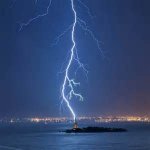
falling into a lightning rod...

uKER
New member
I assumed arq was talking about a video on how to get dynamic brush size using a mouse, but now that I read it again, you're probably right.Yes, a video please. Will be great to see Raiden moving.

Last edited:
arq_hawkin
New member
Yes I was talking about raiden
Cal, about the cloth coming out nice, all I did was check the documentation for it. I didn't have to fight with it too much, since it was looking pretty good with the default settings.
some special notes, not in the manual are:
Have the cloth posed in a natural position, without it clipping.
That helped me get a nicer drape near the cutoff, on the hanging part of the shirt. I had it sticking straight out at first, and let it drop with the simulation, but I kept getting a weird floating look at the waist/the solid areas.
Posing the cloth near the resting pose before simulating, resulted in a more natural drape.
The number of subdivisions helped with detail and clipping. Since vertices are what collide, the more you have the less you'll notice clipping.
Another thing is in the cloth settings, the Depth and Offset help in preventing clipping also.
To use those, you have to turn on the "Use Cloth Depth/Offset" in the options just below.
Scale probably matters also, I'm using real world units.
some special notes, not in the manual are:
Have the cloth posed in a natural position, without it clipping.
That helped me get a nicer drape near the cutoff, on the hanging part of the shirt. I had it sticking straight out at first, and let it drop with the simulation, but I kept getting a weird floating look at the waist/the solid areas.
Posing the cloth near the resting pose before simulating, resulted in a more natural drape.
The number of subdivisions helped with detail and clipping. Since vertices are what collide, the more you have the less you'll notice clipping.
Another thing is in the cloth settings, the Depth and Offset help in preventing clipping also.
To use those, you have to turn on the "Use Cloth Depth/Offset" in the options just below.
Scale probably matters also, I'm using real world units.

la_luna
Member
BTW, ironically Raiden didn't have them in MK2. No idea why they dropped them. Looked amazing in MK1.
Funny thing is they made it, just never used it in a game.. shame, it looks awesome:

There's few more lightning moves they never used in MK2 that look quite nice.
Bleed, looks amazing!
Maybe will be good add a high displace value for the cloth "seams"
BTW, check this out
http://www.polycount.com/forum/showpost.php?p=1915634&postcount=11151
Maybe will be good add a high displace value for the cloth "seams"
BTW, check this out
http://www.polycount.com/forum/showpost.php?p=1915634&postcount=11151
arq_hawkin
New member
I love that design, but the skin looks kind of plastic or wax like
You guys ever have truble with Vray breaking?
I don't know what happened, but now all my renders are coming out way blown out, almost pure white. I didn't touch anything on the lights or the camera, or the render settings..., looks like it just broke some how.
This started happening yesterday, when I was messing with the post render effects to make the eyes glow.
It was rendering fine a few times, then all of a sudden my textures turned black in the view port and all the renders are a white screen almost.
???
I don't know what happened, but now all my renders are coming out way blown out, almost pure white. I didn't touch anything on the lights or the camera, or the render settings..., looks like it just broke some how.
This started happening yesterday, when I was messing with the post render effects to make the eyes glow.
It was rendering fine a few times, then all of a sudden my textures turned black in the view port and all the renders are a white screen almost.
???
yes, did you add a non vray light to the scene? Do you have an object with
interpenetrations or holes/broken geo? Go back to a scene where the problem goes away and compare object lists.
interpenetrations or holes/broken geo? Go back to a scene where the problem goes away and compare object lists.
You guys ever have truble with Vray breaking?
I don't know what happened, but now all my renders are coming out way blown out, almost pure white. I didn't touch anything on the lights or the camera, or the render settings..., looks like it just broke some how.
This started happening yesterday, when I was messing with the post render effects to make the eyes glow.
It was rendering fine a few times, then all of a sudden my textures turned black in the view port and all the renders are a white screen almost.
???
arq_hawkin
New member
Did you check if vray is not the default renderer? Maybe some how when you were messing with the effects to make the eyes glow some how it was changed automaticly to the default scanline renderer!! Because vray by it's own don't do that kind of glowing effect to the emitter objects, What I do to fake that effect is that I increase the light value, by default is set to one but I change it to 5 for instance and the surrounding texture becomes overbright and some how looks like glowing, and than on photoshop I add that glow effect with a brush that simulates light flare or something like that, the problem is that I do it like that cause I do still renders for interior and exterior design... Not animation