Mortal Kombat HD Remix with MUGEN

Well, yeah. I was trying not to be too picky about it but you're probably right.
The waist could probably use some widening to make the sides of the body straighter.
The only deviation from this should be the lats, which should again come out at the height of the diaphragm (they're pretty OK as they are, no issues there).
Note how the sides of the elastic part of the pants become vertical too.

liu3_zps77a_zpse693686d.gif~original
 
uKER please be extremely picky....now. It will annoy Arq much more if you
point out little details later once Lui is rerigged. Your powers of perception are one of your greatest assets on this project.


Well, yeah. I was trying not to be too picky about it but you're probably right.
The waist could probably use some widening to make the sides of the body straighter.
The only deviation from this should be the lats, which should again come out at the height of the diaphragm (they're pretty OK as they are, no issues there).
Note how the sides of the elastic part of the pants become vertical too.

liu3_zps77a_zpse693686d.gif~original
 
Cal, before arq gets to rigging Liu again I expect to see it posed like the game.
That should help keep frustrations to a minimum.

Sent from my Nexus 4 using Tapatalk 4
 
I see.
Well, arq, if there's anything we can do to make things easier for you, just let us know.

Sent from my Nexus 4 using Tapatalk 4
 
Last edited:
Still tweaking little things all over.

The hands like always were a pain in the ass to rig and skin, so it makes an okay looking fist. I had to skin it like 5 times, but I found a mistake and a trick to get them looking better.

I was putting the first knuckle joint a little too far out, so the pivot was in the middle of the pads on the palm. So when I made a fist, it was looking like monkey hands, the palm was too long.

I found that putting the joint a little further back, right where the crease is between the thumb and the pads on the palm, it looks a lot better. Basically the knuckle is centered above that line, I don't know why that was confusing me for so long..., but whatever.

A trick to make a hand model that makes a nice fist, is to use a skeleton, like the biped and make the hand in to a fist. Make sure the bones are looking right, then flatten out the bone hand, and use that as a reference for the real model.

I'll make the stance animation for him tonight.

 
Nice render.
The cloth is looking incredible.

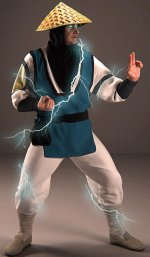
However there's a couple of things that look kinda off to me:

- Have you actually tried to pose your own hand like his left one?
You can get it that way, but it hurts like hell.
To get a more or less relaxed, viable position, you'd want to put the second phalanx (the middle one) at about 30º to the palm.
For believability I'd also make the two straight fingers not so perfectly equal. Maybe give the middle one some curvature. It's hard to keep that finger straight.
The knuckle area should also be further behind than the bottom of the palm.
- The ankles look too thick.
- The texture in the hat is not supposed to have volume like that.
- Are the eyes actually emitting light? How does that crease between his eye and his nose look so dark?

EDIT: Here's this. I had tried doing something to the hat with curves but it didn't work out.

Raiden10_zps7f02cb7b.gif~original
 
Last edited:
Thanks, the eyes are actual lights, I turned the eye balls in to Vray light objects. They don't give off the glow though, I just added that in photoshop with the air brush.

I made the socks a little thick, because he has his pants tucked in on under there.

For the hat, just checked and I had the turbosmooth off on it, that may be why it came out that way.
 
I figured that you had made the "socks" that way on purpose, but I don't know.
It's one of those cases where I'd personally go for what looks best instead of what logic dictates.
Also, keep in mind that those are probably supposed to be bandages and not socks, so they can be made VERY tight.
Of course it's up to you.
Again, great work on the model.

BTW, if you did have trouble with the hands, you nailed it with his right one. It looks perfect.
 
Last edited:
I thought your Baraka was amazing, but your Raiden looks like a real person. The earlier models (such as your Scorpion) were great, but not what I imagined an HD Mortal Kombat would look like. Your Raiden hit the mark, that's MKHD. You've really improved since the project started. I'm excited to see Raiden in motion.
And arq_hawkin's Lui Kang is coming pretty close too.
You guys are really putting a lot of work into this.

By the way, if you have flexible fingers it's actually pretty easy to keep your fingers straight in a pose like the left hand.
 
I never said it couldn't be done.
I just said it would look more natural if they weren't so straight since it's a pretty forced position.
 
There is still a lot of room for improvement, so hopefully the next character will look even better. Thanks to this project, I'm learning so much, it's a huge motivation for me.
 
There is still a lot of room for improvement, so hopefully the next character will look even better. Thanks to this project, I'm learning so much, it's a huge motivation for me.

I still can't wrap my mind around if that clothing and the folds are modeled or will actually deform dynamically. Maybe you can make a video illustrating the process. Ive never been able to make dynamic cloth look so good.
 
bleed, you just keep getting better and better, I would like to see carlos pesina's commentary on this model, and I would like to see NRS commentaries also... great job man, when I was young I always afraid of raiden... don't know why, maybe the lightings all over his body all the time.... I would LOVE to see that model like MK2 raiden's costume


edit:
SORRY BLEED BUT I COULDN'T RESIST THE TEMPTATION......:bird:

Raiden10_zps7f02cb7b.jpg
 
Whoa, those sparks look amazing.
How did you make those?

BTW, ironically Raiden didn't have them in MK2. No idea why they dropped them. Looked amazing in MK1.

Sent from my Nexus 4 using Tapatalk 4
 
Last edited:
I just googled it, I wrote lighting png on google, I downloaded a single lightning and copy and paste, scale and rotate some sections and than added an outter glow to that layer with blue as the main color.. I mean, light blue as the main color and played with the oppacity.... it's ease
 
Top