Mortal Kombat HD Remix with MUGEN

That means you'll need to model more of that detail in to the real time mesh. The normal map can help with the finer details, but you need the primary and secondary forms, better represented in the model. Right now, it's not and that makes the normal map look more like scratches.

When you make a render with the normal map, keep it in Gray scale at first. Put it next to the actual sculpt in Zbrush, and they should be almost indistinguishable.

The low poly mesh should look pretty close without normal maps. Use the normal map to add that extra super fine detail, almost like you would with a regular gray scale bump map.

In order to sell the effect of the normal map, you need to help it along with the larger forms, or it won't look convincing.
 
No no, I meant the earlier images you posted of this new model. This one: http://grab.by/ffVI

He looked MUCH better there, in my opinion. These new shots make him look kinda murky/muddy.

Ok this kind of represents the best I can get it. Matching zBrush exactly will unfortunately never happen but I think this is a reasonably good render:

GORO_TEST_G.png
 
Ok this kind of represents the best I can get it. Matching zBrush exactly will unfortunately never happen but I think this is a reasonably good render:

GORO_TEST_G.png

I'm liking this better and I agree with what badmouse said about the specular helping out with the rest.
 
Totally cool man, but Goro's chest is bigger. His pectorals are also more pronounced, almost like boobs. http://www.mortalkombatwarehouse.com/mk1/goro/#sprites

Overall his whole body is bigger, like his legs for instance. With that being said, this model is A LOT closer to the original than the previous one, and I'm loving the lack of spikes and blood in the model. Now he is MK1 Goro... but please, keep tweaking because this character is a symbol of MK1, it is a big deal.
 
Ok so after hours of trial and error...I'm happy to report I got Vray to render (just about perfect) displacement mapping. So now Goro's muscles have the correct amount of volume which should help his pecs and overall muscles look bigger.

GORO_TEST_K.png


GORO_TEST_I.png


GORO_TEST_J.png
 
Great progress, that mk3 scorpion youtube fight looks mindblowing.

Kinda offtopic, I have a question, a while ago someone posted a program that lets you put a transparent image on top of any 3d program to create an object while the image stays on the screen, I remember it was a few months ago when there was a discussion about Shang Tsung, can anyone help me with the page number, i can't find it, I want to download that program.
 
Kinda offtopic, I have a question, a while ago someone posted a program that lets you put a transparent image on top of any 3d program to create an object while the image stays on the screen, I remember it was a few months ago when there was a discussion about Shang Tsung, can anyone help me with the page number, i can't find it, I want to download that program.

Maybe this:

I've been using this reference tool a lot lately, it's pretty helpful.

http://www.digitalartistguild.com/misc/UtilityExplain/UtilityExplain.html

It's supposed to stay on top of other applications if you press F1, but some times it doesn't work with Zbrush.

If that's a problem, I use Desk Pins to force it on top.

http://www.snapfiles.com/get/deskpins.html


Goro looks sick calactyte. One small detail, maybe you could "tighten" his leg bandages,
they're suppose to go really tight around the ankles and they look kinda loose on Goro.

5l18bp.png


I'd remove some shadows which give a loosy feel to it, and made them closer to the skin
something like this:

23t05yb.png


Love your work on Shang Tsung btw, maybe a few subtle changes on his clothes movement
(slow it down maybe) would make him look even better imo.
 
Last edited:
Okay... now THAT is the clay model of Goro...!!! :D with a little adjustment on the bandages (like la_luna said) this will be 100% perfect! Now I don't know who will be crazy enough to animate his MK1 stand because it looks tricky as hell.

Edit: Maybe the original one is still more muscular than this version?
 
Last edited:
I'll be getting back to this soon, I'm busy with some other stuff right now, like finding another job but I'm thinking about this all the time. This project has been a great motivator for me, I think it'll help to get a nicer demo reel put together, so it's important.

I'm quiet but I'm not out FYI.
 
OK another Goro Update. I think he is just about finished. I've added some specular gloss to him to mimic the original plastic look, but I'm trying for it to be a little more subtle, like sweat. What do you guys think?

GORO_TEST_N_reflection.png


GORO_TEST_O_reflection.png


GORO_TEST_P_reflection.png
 
hello again, I saw liu's comments, I will try to fix it as soon as possible, I've been very busy these days.. but to tell you the truth I think in the reference image he is like shrugged I think....


hey calactyte this goro is looking GREAT, really like his skin now, I'm not really sure about the fabric on his legs but it's ok if you leave it like that.... I REALLY REALLY wanna see him full animated, will you give him this kind of stop motion animation he had in mortal kombat game??? or are we gonna have more realistic movements?? both options are nice IMO
 
OK another Goro Update. I think he is just about finished. I've added some specular gloss to him to mimic the original plastic look, but I'm trying for it to be a little more subtle, like sweat. What do you guys think?

GORO_TEST_N_reflection.png


GORO_TEST_O_reflection.png


GORO_TEST_P_reflection.png

This looks great calactyte. Good work.
 
Goro is looking a lot better all of a sudden, meaty.

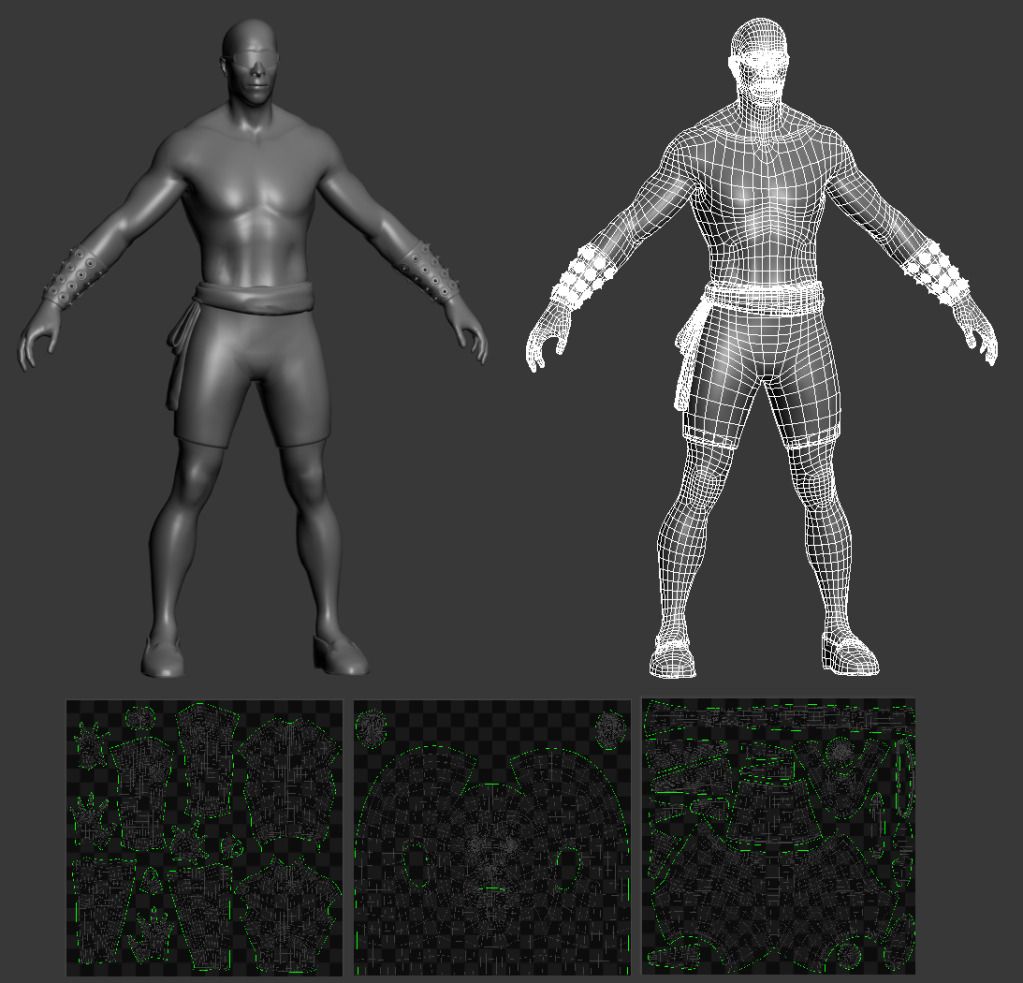
I got a little more done for Cage's UVs

The model is basically what I used for sculpting, level 2 subdivision with some minor edits.

Cage11.jpg
 
OK another Goro Update. I think he is just about finished. I've added some specular gloss to him to mimic the original plastic look, but I'm trying for it to be a little more subtle, like sweat. What do you guys think?

GORO_TEST_N_reflection.png


GORO_TEST_O_reflection.png


GORO_TEST_P_reflection.png


really fantastic!! great job!!!!!!!!!!!!!!!!!!
 
Very nice UVs on Cage. A few questions Bleed. Will you use just normal mapping or will you use displacement mapping?
Also I noticed three sets of UVs. The clothing understandbly has its own set. But I notice the body and head with different UV space. Are you attaching the head to the body in the modifier stack via edit mesh/poly or are you using some other method of keeping the head and body as two different UV spaces although they are one object?


Goro is looking a lot better all of a sudden, meaty.

I got a little more done for Cage's UVs

The model is basically what I used for sculpting, level 2 subdivision with some minor edits.

Cage11.jpg
 
Top