Mortal Kombat HD Remix with MUGEN

I dont think I mentioned but Goro looks sick. : D
View attachment 3650View attachment 3651View attachment 3651View attachment 3652View attachment 3654View attachment 3655View attachment 3653
updates: more definition on the body, ear is more defined (still tweaking), hands(not shown in pic) have been resized to be proportionate to the body, face and neck resized, legs are a bit thicker and hips wider, nose slightly widened, clothing resized to fit character better, waist cloth has been lowered (thanks, MrMos3s, for the suggestion). Shader is still being tweaked till the end of the modeling process. The hair and eyelashes are painted on roughly to give an idea. I'll look into making the pics show up without having to be logged in so anyone can check it out.

Looking a ton better! Great work.
 
Just my opinion, but I'm not really feeling the changes to Goro. While the blood looks very realistic, it's certainly not accurate, which I felt was the goal. Plus, it would be kinda weird for him to have the blood smear at the beginning of the fight. I don't know, it just seems more like a choice for a MK1 Remake than HD.

Also, his head looks a bit like a deformed rubber Halloween mask with the enlarged eyes. And again, just not accurate. During the fight Goro's eyes were never visible, which made him seem way more intimidating. The bulgey eyes he has now makes him seem like a dim witted brute instead of a prince.

These of course are just my opinions. I think Sonja is coming along well.
 
You are correct from a purity standpoint, on the blood. With the increased resolution we can only guess at certain aspects of what should or shouldn't be there. For instance, Goro's foot wraps are super white in the original, but that just doesn't seem right given his Lair environment. I'm creatively extrapolating here that Goro has perhaps recently killed another opponent prior to fighting you. There is evidence that supports this theory given the blood splattered on the left and right walls. Also that original blood splatter is a bright red as though it was fresh. I like the blood. I also like that he is dirty looking. I think the smeared blood and dirt are more than cosmetic. They help tell a story. Did Goro just destroy a previous opponent? That's intimidating. It helps evoke that emotion I had when I was 12 years old playing MK1. I remember my heart racing as people crowded around the arcade to see if I could beat Goro. I think the blood helps sell the intimidation factor.

As for the red eyes, I don't have the picture now but the original intention was for Goro to have red eyes. It seems that in the end they decided to turn his eyes black. It was a tough call, because lots of people were calling for his eyes to be red early on when Gojira built the model. That being said, I agree with you on this. I'll change his eyes to black. I agree, the red eyes aren't making him look intelligent and the horror factor is lost.

So I'll compromise here, remove the red eyes and turn them black but keep the blood and dirt. It is in my opinion a small improvement which I think the original creator's would agree with if they were standing in our shoes today.



Just my opinion, but I'm not really feeling the changes to Goro. While the blood looks very realistic, it's certainly not accurate, which I felt was the goal. Plus, it would be kinda weird for him to have the blood smear at the beginning of the fight. I don't know, it just seems more like a choice for a MK1 Remake than HD.

Also, his head looks a bit like a deformed rubber Halloween mask with the enlarged eyes. And again, just not accurate. During the fight Goro's eyes were never visible, which made him seem way more intimidating. The bulgey eyes he has now makes him seem like a dim witted brute instead of a prince.

These of course are just my opinions. I think Sonja is coming along well.
 
I like the dirt on him, but it could be toned down a bit. His skin looks a little too red / tanned also.

You can overlay the SD and HD version of him in Photoshop, then flick the layer on and off. Noticeable changes should be at a minimum.

The HD version should have more details, without changing the look too much.

Reference people living in poverty.
 
Last edited:
You are correct from a purity standpoint, on the blood. With the increased resolution we can only guess at certain aspects of what should or shouldn't be there. For instance, Goro's foot wraps are super white in the original, but that just doesn't seem right given his Lair environment. I'm creatively extrapolating here that Goro has perhaps recently killed another opponent prior to fighting you. There is evidence that supports this theory given the blood splattered on the left and right walls. Also that original blood splatter is a bright red as though it was fresh. I like the blood. I also like that he is dirty looking. I think the smeared blood and dirt are more than cosmetic. They help tell a story. Did Goro just destroy a previous opponent? That's intimidating. It helps evoke that emotion I had when I was 12 years old playing MK1. I remember my heart racing as people crowded around the arcade to see if I could beat Goro. I think the blood helps sell the intimidation factor.

As for the red eyes, I don't have the picture now but the original intention was for Goro to have red eyes. It seems that in the end they decided to turn his eyes black. It was a tough call, because lots of people were calling for his eyes to be red early on when Gojira built the model. That being said, I agree with you on this. I'll change his eyes to black. I agree, the red eyes aren't making him look intelligent and the horror factor is lost.

So I'll compromise here, remove the red eyes and turn them black but keep the blood and dirt. It is in my opinion a small improvement which I think the original creator's would agree with if they were standing in our shoes today.

@Cal

That's fair, man. I wasn't trying to come down on your work or anything, just throwing my opinion out there. All of the dirt and stuff works well I think, and the blood isn't a huge thing either, but it is a departure. I am glad you agree about his head though. This project practically IS you and Bleed, so you guys know what works and what doesn't. Keep up the good work man.

@ Tiago

Not really on the same page there.
 
Forget about it, i just agree with the black eyes, Bleed, take a look at the screenshots i made

Ah, some of them i cant see :(
 
Last edited by a moderator:
Oh I know Justin, no worries. I was just explaining my reasoning behind the decision to add the blood and dirt.

But I'm glad you pointed out the red eyes. Something was bothering me about it and I couldn't figure out what it was.

@Cal

That's fair, man. I wasn't trying to come down on your work or anything, just throwing my opinion out there. All of the dirt and stuff works well I think, and the blood isn't a huge thing either, but it is a departure. I am glad you agree about his head though. This project practically IS you and Bleed, so you guys know what works and what doesn't. Keep up the good work man.

@ Tiago

Not really on the same page there.
 
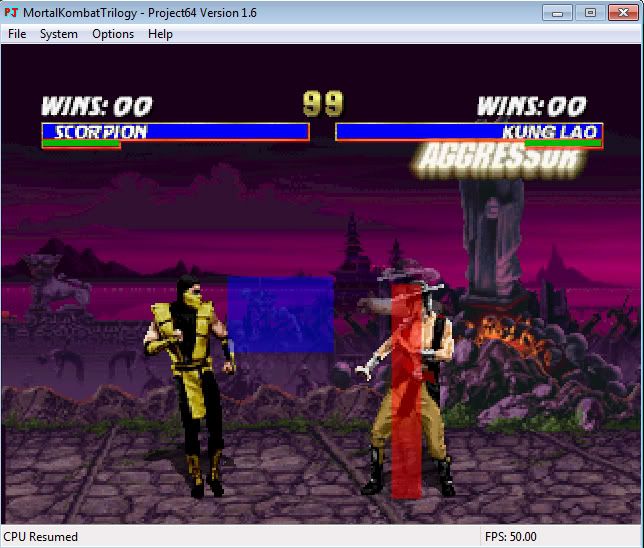
This is neat, I found an N64 emulator for MK Trilogy and you can see the collision boxes! Finally, been looking for this for a long time.

MKT_collisionbox.jpg
 
Last edited:
Wow nice find Bleed.

If anyone would like to take a crack at Goro's Character Portrait, here you go. Will probably need some image editing and darkening in the eye socket areas but this should be a good base to work with.

GORO_PORTRAIT_RAW.png


This is neat, I found an N64 emulator for MK Trilogy and you can see the collision boxes! Finally, been looking for this for a long time.

MKT_collisionbox.jpg
 
I don't know that Goro render makes his face looked crunched together...like a one of those mut mini-dogs. I also don't really see a need for the blood across the chest, unless he's engaged into a bloody fight. The toes look a little bulky too, and I think that the sash could use a little more loosing up to where the ends of the sash hang down a little more to about thigh level on his hip. But other than that looks good. I just think that it could use some more touch ups before the final render is completed.
 
I had the game on N64, but I sold it to a friend at work a long time ago. That was before I started doing the MK mugen stuff in detail, now I kick my self for getting rid of it...

I found emulators before, but couldn't figure out how to make the code work. It's a secret menu in MKT for N64 that let's you turn on Collision display.

In the story screen, you have to do this code: BLK,HK,LK,Run,LP,HP,HP,HP,LP,LP

Then go to the main battle type screen, and press Up+Start to get the game options. There are two new options now, a blue and a Red Question mark with secret options.

The code doesn't work in the emulator like normal, but I found there is an option in the emulator it self, that lets you turn on the cheats from a list.
Like setting your preferences in any program.
 
I'm not messing with the feet. To me they look proportionate to his hands. As for the sash, I think the perspective of the render might be throwing the length off. It does hang down to his thigh. Not sure about his face, it isn't dead on but I can't say it is that far off either.
 
I keep forgetting to ask... well until today, but question about mugen. I'm gonna see what I can do about Sonyas hair, or if Calactyte is still up for it at the time then cool. But if I texture hair on the polygons and the end tips are transparent will mugen be able to show that. I thought i read early on in the forums something about mugen not being able to display transparencies. If not, what would be the best way?
 
It will handle transparency the same way it did for the real actors.

It can show the strands, but with a hard edge, no antialiasing.

Try this, make a sample render of your hair polygons with transparency, as .png.

Open the file in Photoshop, and convert the image to indexed color with transparency on. You'll then see how it will look in mugen.


Make sure your background color in Maya or Max is black, or you'll get a white outline when converting to Indexed color.


It's the same thing you need to have a .gif show up correctly online. 256 colors, with 1 reserved for transparency.
 
It will handle transparency the same way it did for the real actors.

It can show the strands, but with a hard edge, no antialiasing.

Try this, make a sample render of your hair polygons with transparency, as .png.

Open the file in Photoshop, and convert the image to indexed color with transparency on. You'll then see how it will look in mugen.


Make sure your background color in Maya or Max is black, or you'll get a white outline when converting to Indexed color.


It's the same thing you need to have a .gif show up correctly online. 256 colors, with 1 reserved for transparency.
Ah, I learn something new everyday, awesome. thanks, just tried it.
 
Top