Mortal Kombat HD Remix with MUGEN

Or better, there's plenty of room for improvement.

I didn't realize it was that many, I don't even think about it :/

I'm making a larger render for Scorpion's ending, and I'm having a lot of trouble with the opacity map on the eyebrows For some reason Mental ray gives me an incredibly hard time with opacity maps...

I'm getting a shadow from the plane where the hair is textured on the head, even though it's transparent. I'm just going to fix it in Photoshop, because I can't get rid of that shadow.
 
MantalRay and shadows of Opacity materials is a pain! I had a lot of problems in Maya but i figure out how to fix them. some default mentalray setting in the materials make some troubles.

Maybe in max is in different place but in maya, in the attributes of your material, under mentalray/Photon Attributes, by default is Derive From Maya, but by default The Translucence Focus is set to 0.5 and that make semi transparent shadows of your object. Setting that to 0 all works well in maya.
 
can you post a pic of that shadow problem?
i might be wrong but sometimes it's tha way your light casts shadows.
for example if you use a shadow map, it casts shadows even on transparent areas. but ray traced shadows will just cast shadows on whats opaque. (in 3d max)
 
hello, I haven't post the new animation of the fighting stance because I don't know why but liu's file won't simulate the animation, I hit the button and nothing happends but I open a new file and ad a simple cloth simulation and it works, I google it but I can't find anything, any idea, Bleed? calactyte?
 
Hmm off hand I'm wondering if you were caching sim files somewhere and that link was broken... May need to run the sim again on the cloth. Try opening a new file and then merg all the lui elements into that. Then re-sim from there.
 
Here's the problem.

I know the hair looks like shit, I made it real fast and it's ok for the smaller sprites, but needs some photoshop editing to look real at larger scale...

Real hair sim takes too long to render and is hard to control, so I didn't bother.


I'm using photometric lights and they all have Ray Traced Shadows on.

 
Last edited:
Have you tried making the eyebrow objects not able to receive or cast shadows in object properties? You right click on the object and select Object Properties from the quad menu to access these check boxes.
 
MrMos3s, I added a .psd to drop box with a few large renders of Scorpion's ending. You can use them to mask different areas, so just see what you can do with that, thanks.

You'll have to add the textures for the cloth and if you can find a picture of someone with similar hair, replace it.
 
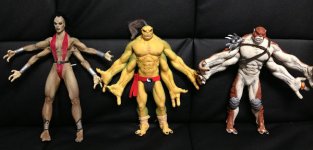
Hey guys, Ed recently posted he found some of the maquettes they used in the original trilogy in his basement. It's a smaller image but I figure these could come in handy as they're in pretty good shape compared to some of the other versions of Goro, Kintaro and Sheeva that have survived over time.

762318230.jpg
 
I think it has to do with the geometry and the flow of polys...I had similar issues before with Ray Traced Shadows, it's just I don't really remember how to fix it.

Have you tried a different lighting setup too and see if that has any affect on it ?
 
I haven't, but I'm guessing scanline render doesn't have this problem, only happens when using Mentalray. I was searching the web for answers, but nobody seems to be able to figure it out... need to keep looking.
 
SSS won't work on default scanline at all...

I'd say change your lighting setup a bit, see if it affects it, and any other parts of the model.

The only thing I could find on the net the reason for this is because of geometry not having enough polys/bad flow etc...The usual stuff...and this: http://forums.cgsociety.org/archive/index.php/t-353038.html
I think that thread has a similar issue, too bad that the pics are dead though.
 
Last edited:
Top