
You are using an out of date browser. It may not display this or other websites correctly.
You should upgrade or use an alternative browser.
You should upgrade or use an alternative browser.
Mortal Kombat HD Remix with MUGEN
- Thread starter Spawn16
- Start date


Mortal Wombat
Member
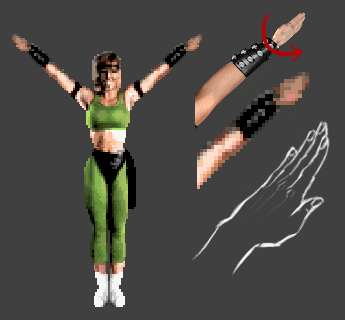
Maybe I'm nitpicking a lot lol, but looking at the picture again, I'm wondering if the hands are rotated in the right direction:
[MENTION=15952]Cris Berserk[/MENTION]
even though the original is very pixelated.... the smile on her face looks alot bigger and huger than the one you have in the model.
In the model is looks like more of a smirk. Change the smirk into a full blown happy smile and it might help.

Cris Berserk
Member
[MENTION=15952]Cris Berserk[/MENTION]
even though the original is very pixelated.... the smile on her face looks alot bigger and huger than the one you have in the model.
In the model is looks like more of a smirk. Change the smirk into a full blown happy smile and it might help.
When I make the animation of the winner Sonya position, perhaps
I make an adjustment to smile Sonya.
But right now my goal are the portraits.
Sonya:
- Selection of characters
- Final 1
- Final 2.

arq_hawkin
New member
When I make the animation of the winner Sonya position, perhaps
I make an adjustment to smile Sonya.
But right now my goal are the portraits.
Sonya:
- Selection of characters
- Final 1
- Final 2.
You can do the bio movie aswel!! Is pretty easy too, just a rotating camera.
By the way I've been finishing liu animations and fixing some sprites with intersecting cloths!! Now I have to find a helpful soul who helps me coding the character in mugen or I will have to do it myself, the funny thing is that I don't know how!!

Keep rolling man. You are just about completed with Liu. You have maybe 4 animations left now?
You can do the bio movie aswel!! Is pretty easy too, just a rotating camera.
By the way I've been finishing liu animations and fixing some sprites with intersecting cloths!! Now I have to find a helpful soul who helps me coding the character in mugen or I will have to do it myself, the funny thing is that I don't know how!!
arq_hawkin
New member
Keep rolling man. You are just about completed with Liu. You have maybe 4 animations left now?
ummmm yeah,
low kick
bio
and finish the decap animation
I would like to know how bleed did it?
I have know idea what to do!!! just render the head? animate the head falling down? I just have no idea
I took the head of the character, and hid it on the main body by scaling it down with a morph target. Made a copy of the head as a separate model.
I made a neck model that I stuck on the body, and a copy of it on the head.
To animate the head, you could link it to a sphere to make the rolling animation easier to accomplish. It'll be easier to notice if it's wobbling when you spin it.
You basically have to swap the model in one frame.
I made a neck model that I stuck on the body, and a copy of it on the head.
To animate the head, you could link it to a sphere to make the rolling animation easier to accomplish. It'll be easier to notice if it's wobbling when you spin it.
You basically have to swap the model in one frame.
arq_hawkin
New member
thanks bleed, I already found a way to do it, I don't know if it was easier or harder but this is what I did:
I made the body falling animation with the head, saved as that file two times more, one without the head and the other one just for the head, animate the head and then import the animated head into the headless file and finally I just rendered the first few frame from the original file (the one with the head), then render the other missing frames from the file with the head imported...
no morph targets needed
this is what I got.

I have to fix a little bit the head animation... but you got the idea
I made the body falling animation with the head, saved as that file two times more, one without the head and the other one just for the head, animate the head and then import the animated head into the headless file and finally I just rendered the first few frame from the original file (the one with the head), then render the other missing frames from the file with the head imported...
no morph targets needed
this is what I got.

I have to fix a little bit the head animation... but you got the idea

errormacro08
Member
That looks just awesome, arq_hawkin. You really hit the bullseye with every new animation.
john timbo
New member
good job,fantastic.
Yes, that's my next goal.
Here another update Sonya.
View attachment 6470
@ Cal, I tried to send a PM to you but your box is full of private messages.
That's perfect now

Great job !

londonhellgate
BANALITY
thanks bleed, I already found a way to do it, I don't know if it was easier or harder but this is what I did:
I made the body falling animation with the head, saved as that file two times more, one without the head and the other one just for the head, animate the head and then import the animated head into the headless file and finally I just rendered the first few frame from the original file (the one with the head), then render the other missing frames from the file with the head imported...
no morph targets needed
this is what I got.
I have to fix a little bit the head animation... but you got the idea
It´s rock ´fn Roll, oh yeee!!!!!!

Hello guys
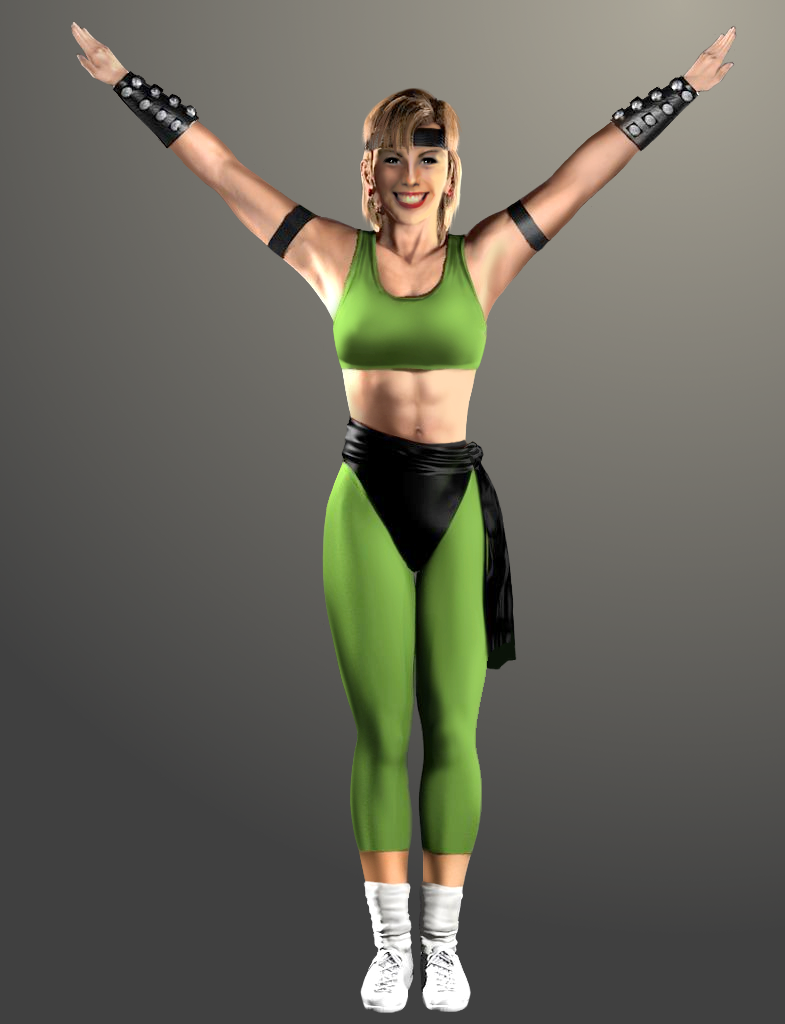
I tried to make some adjustments with Gimp on the last render of Cris in order to make it match better with the original sprite. It's not perfect but let me know what you think about it.
I know this could take some time to do it but what do you think about editing rendered sprites with gimp or photoshop in order to improve things like hairs, face and shadows ? ( sorry for my bad english ^^; )
Original sprite from Cris Berserk:
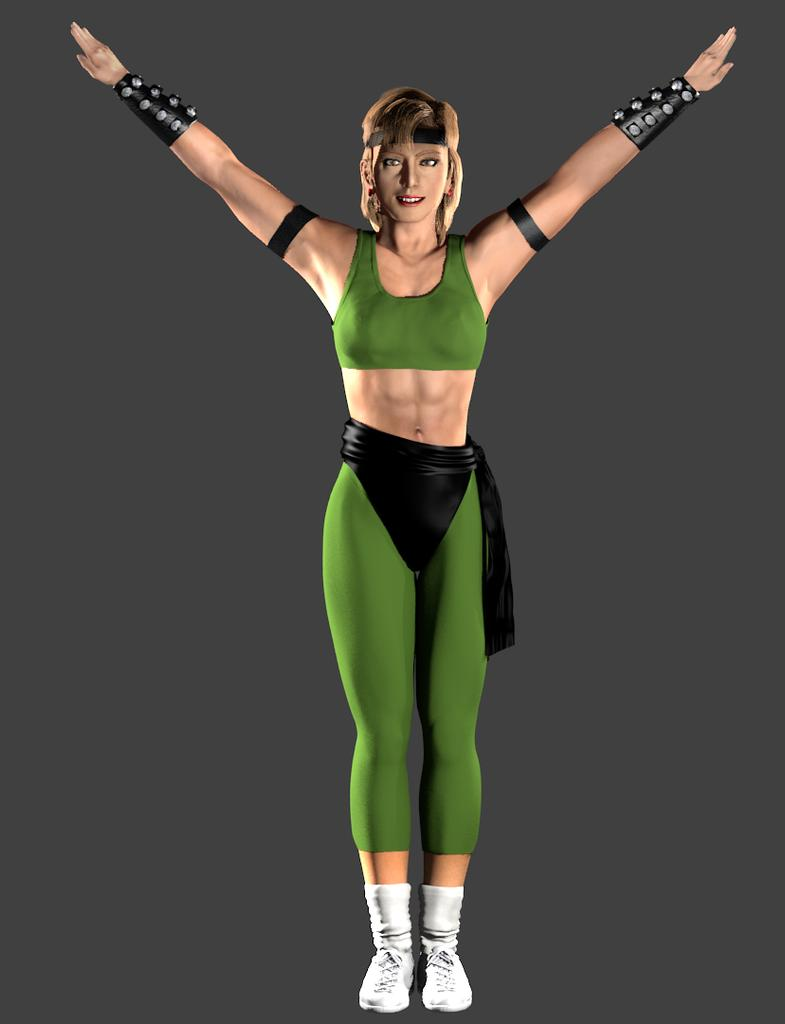
Edited sprite :
I tried to make some adjustments with Gimp on the last render of Cris in order to make it match better with the original sprite. It's not perfect but let me know what you think about it.
I know this could take some time to do it but what do you think about editing rendered sprites with gimp or photoshop in order to improve things like hairs, face and shadows ? ( sorry for my bad english ^^; )
Original sprite from Cris Berserk:
Edited sprite :

uKER
New member
Um, while I don't think that looks very Malecki, you definitely have some skills.
While very nice, I think you made her look too "cheerleader-y". Malecki is more of a c0cky tomboy.
I couldn't resist having a go at it, so here it is.

What I tried to tackle was:
- More prominent cheekbones
- Crease runing vertically along the sides of the mouth
- Lowered the center of the eyebrows to look more badass, darkened them and widened the space between them
- Moved the mouth a bit higher and made it a bit wider and slightly crooked to give it that cheeky grin
- Smoothed out the teeth (looked too much like she had bad teeth)
- Evened out the eyes' makeup. Seemed like there was some missing in her lower eyelashes.
- Made the eyes darker. For some reason she looks a bit hollow-eyed.
- Made the chin a bit larger to give her a stronger face
- Slimmer, more defined armpits.
I don't know how easy any of this will be to translate to the 3D model, but I guess at this point any improvement is a bonus.
While very nice, I think you made her look too "cheerleader-y". Malecki is more of a c0cky tomboy.
I couldn't resist having a go at it, so here it is.
What I tried to tackle was:
- More prominent cheekbones
- Crease runing vertically along the sides of the mouth
- Lowered the center of the eyebrows to look more badass, darkened them and widened the space between them
- Moved the mouth a bit higher and made it a bit wider and slightly crooked to give it that cheeky grin
- Smoothed out the teeth (looked too much like she had bad teeth)
- Evened out the eyes' makeup. Seemed like there was some missing in her lower eyelashes.
- Made the eyes darker. For some reason she looks a bit hollow-eyed.
- Made the chin a bit larger to give her a stronger face
- Slimmer, more defined armpits.
I don't know how easy any of this will be to translate to the 3D model, but I guess at this point any improvement is a bonus.
Last edited:

rrc1980
New member
Hello guys
I tried to make some adjustments with Gimp on the last render of Cris in order to make it match better with the original sprite. It's not perfect but let me know what you think about it.
I know this could take some time to do it but what do you think about editing rendered sprites with gimp or photoshop in order to improve things like hairs, face and shadows ? ( sorry for my bad english ^^; )
Original sprite from Cris Berserk:
Edited sprite :
pal, the edited image of the character Sonya Blade Looks great, I liked the lighting and the expression of the face of the character, I think to improve must be decreased slightly smiling mouth of the face, so we will not get something ugly. is much more real and less plastic or fake