
You are using an out of date browser. It may not display this or other websites correctly.
You should upgrade or use an alternative browser.
You should upgrade or use an alternative browser.
Mortal Kombat HD Remix with MUGEN
- Thread starter Spawn16
- Start date
Hi, you guys are doing a great job, i wanna share this picture i found some time ago, i don´t know if it was posted before on this thread

original source
http://www.animationinsider.com/2013/06/curt-chiarelli/
original source
http://www.animationinsider.com/2013/06/curt-chiarelli/
Last edited:
zeoboromir
New member
Yo también!, de mi Santiago querido!


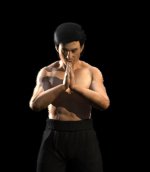
You can mix standard max lights with GI lights to get the desired effect though it slows down render time. Mess around with the standard max spotlight and you'll see it allows you to "paint" with the light.
Thanks for the critique guys, I'll make some changes.
I have two lights in front and to the sides actually, If I make them too strong the GI becomes washed out and looks like a solid white mass...


dakamurra
New member
Global Illumination?
dont know can try with vray lights to
dont know can try with vray lights to
I've had problem getting vray lights to give the expected result without increasing the intensity to an insanely high number.

arq_hawkin
New member

arq_hawkin
New member
nop, I didn't do anything to the hair,

DFGHTENNIS
Member
Wow, great work arq 
there's a really easy way to get gi with just one vray light setted to dome
URL=http://s1329.photobucket.com/user/arq_hawkin/media/ending2_zps5a1d199e.png.html
first try ending2
Very nice.
Maybe, the shadow more blured
Last edited:

arq_hawkin
New member
That looks great, I just would add a stronger light on the left side of his face an on his right fist, can you make that last one just to see
arq_hawkin
New member
Mrmos3s tomorrow I will upload both ending pics, do you think you can work on them so we can have both pics done for the next week
