
You are using an out of date browser. It may not display this or other websites correctly.
You should upgrade or use an alternative browser.
You should upgrade or use an alternative browser.
Mortal Kombat HD Remix with MUGEN
- Thread starter Spawn16
- Start date

DjangoJustin
New member
And here's the new version of the Character Select theme. Since my last version of this theme was pretty much universally disliked, I'm curious to see how this one finds you guys. ;P
http://www.mediafire.com/download.php?hcn19tibg3id8fg
http://www.mediafire.com/download.php?hcn19tibg3id8fg
I love it, especially that heavy string with the melody, awesome!
Here's another update from my end.
Making of the Ice blast with a couple videos.
http://www.youtube.com/watch?v=HytLmm--1BM&feature=plcp
First pass at this one, I should have made his hands and the vest shake a little on the snap.
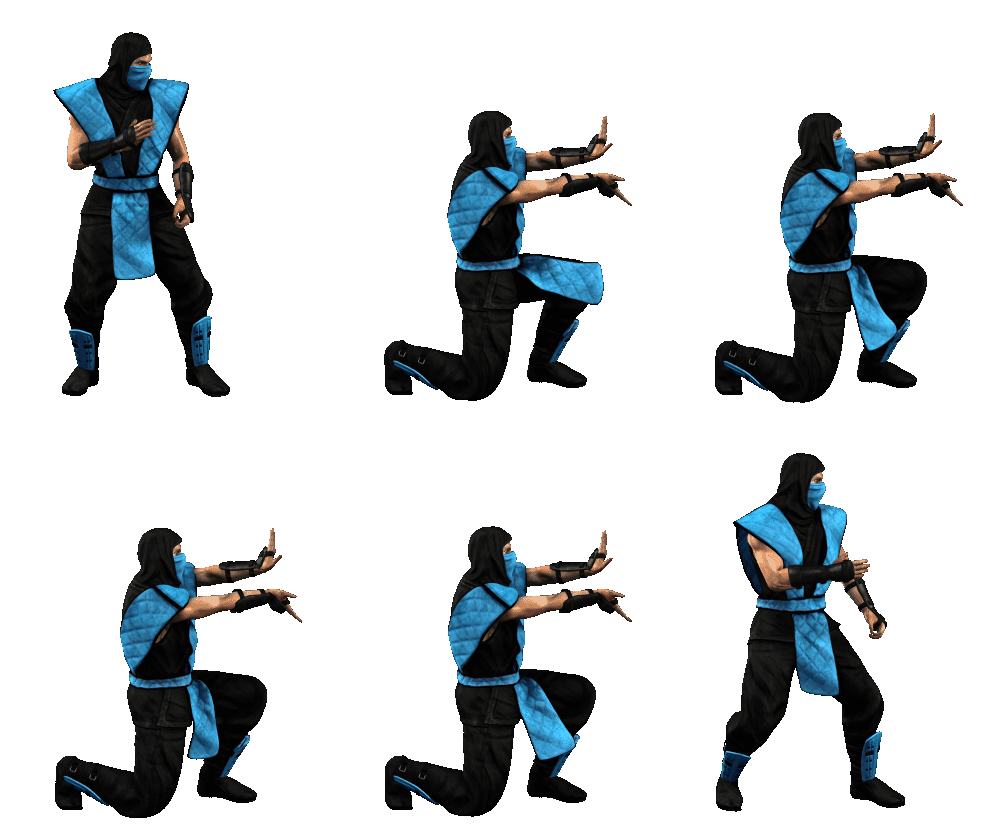
Here's another update from my end.
Making of the Ice blast with a couple videos.
http://www.youtube.com/watch?v=HytLmm--1BM&feature=plcp
First pass at this one, I should have made his hands and the vest shake a little on the snap.
Last edited:

DFGHTENNIS
Member
Bleed You are so fast well done ,nice video BTW.
@Justin,I don't know maybe it's just me but your select character theme is closer to MKAK main menu theme.IMO
@Justin,I don't know maybe it's just me but your select character theme is closer to MKAK main menu theme.IMO

UNREALWINS
Member
I love it, especially that heavy string with the melody, awesome!
Here's another update from my end.
Making of the Ice blast with a couple videos.
http://www.youtube.com/watch?v=HytLmm--1BM&feature=plcp
First pass at this one, I should have made his hands and the vest shake a little on the snap.
Perfect!!! Amazing!!!

MortalLevent
New member
hi everbody
somebody help me pls
i have mk 2 mugen for example when i do fatality with kunglao, (Kunglao wins text coming early ) Kungla Wins sound coming late
how i can do Kunglao Wins text +Kunglao Wins sound at the same time
thank you
somebody help me pls
i have mk 2 mugen for example when i do fatality with kunglao, (Kunglao wins text coming early ) Kungla Wins sound coming late
how i can do Kunglao Wins text +Kunglao Wins sound at the same time
thank you

la_luna
Member
@MortalLevent, I'm sure few users from here can answer that question and solve your problem, but I think it's more appropriate to ask those kind of questions on MUGEN forums. This thread is huge as it is.
@Bleed, I haven't had access to my desktop computer for 2 days so I'm a little late with this. Sorry bout that.
Here's Toasty sprites with neck filled with black. If there's something wrong with it, please tell. I don't know first thing about MUGEN so I might've overlooked or missed something.
http://www.sendspace.com/file/f1llld
edit: just noticed Ice Blast, it's fantastic!
Does his right knee go too deep? Maybe flatten it a bit, like it's pressing against the ground.
@Bleed, I haven't had access to my desktop computer for 2 days so I'm a little late with this. Sorry bout that.
Here's Toasty sprites with neck filled with black. If there's something wrong with it, please tell. I don't know first thing about MUGEN so I might've overlooked or missed something.
http://www.sendspace.com/file/f1llld
edit: just noticed Ice Blast, it's fantastic!
Does his right knee go too deep? Maybe flatten it a bit, like it's pressing against the ground.
Last edited:
hi everbody
somebody help me pls
i have mk 2 mugen for example when i do fatality with kunglao, (Kunglao wins text coming early ) Kungla Wins sound coming late
how i can do Kunglao Wins text +Kunglao Wins sound at the same time
thank you
If the sound files are using two different channels, you can have them play at the same time.
If a sound is playing, and another one starts on the same channel, it will override it.
If a sound plays and another sound plays right after, it was probably coded to work that way, using a time or statedef trigger.
DjangoJustin
New member
Glad ya liked it Bleed.  The Ice Blast looks pretty spiffy. The only thing that jumps out at me is the loin cloth moving so much. Maybe it should "react" less? I don't know, it's prolly fine.
@DFGHTENNIS, I guess I do hear a bit of the MK1 theme from MKAK in there. Hmmm, is that a bad thing though? I'm not sure if you were suggesting I change something or what.
If any one else could offer their opinions that would be very helpful. I really want to get this piece "right."
The Ice Blast looks pretty spiffy. The only thing that jumps out at me is the loin cloth moving so much. Maybe it should "react" less? I don't know, it's prolly fine. @DFGHTENNIS, I guess I do hear a bit of the MK1 theme from MKAK in there. Hmmm, is that a bad thing though? I'm not sure if you were suggesting I change something or what.
If any one else could offer their opinions that would be very helpful. I really want to get this piece "right."
Last edited:
Next week i'll start to change scorpion's old sprites for the new ones but there's something that is really worrying me, the quantity of sprites per animations and we are talking about HD sprites.
i've read here that scorpions fatality has 99 sprites, wow!
Bleed: maybe you can make it smoother for you standalone character but we need to think that we will have all characters into a single file.
don't get me wrong, the fatality looks great but for example there are a lot of "innecesary" movement of the mask at the end of the animation, same goes for blocking wich is supposed to be a pretty simple animation, it has 47 sprites!
this is cool for a 3D engine but not for mugen. probably later a skilled 3D coder shows up and you can make it better but we need to think about mugen now.
As i said I'll add all the sprites and then i'll make 2 or 3 sets of animations. full, intermediate, and less. off course the full character will look great but we need to start thinking in something in the middle or the character will have a 1gb file wich will hang your computer or takes minutes to load =/
i need to say this now we are in time to prevent these situations
we can make the character looks better adding the triple of sprites, probably more probably less, it depends of each the animation but standing block are 15.6x
Neutral jump is another example of insane quantity of sprites.
We need to find a balance.
A) your character have a statedef 180 in his files so this have priority over the common file.
B) your character's winpose is in a custom state, and not 180 as usual.
open the debug mode (ctrl+d) win the match and look at what statedef is your character.
when you know this repeat the process (look for this statedef in your character's cns files or common1.cns)
i've read here that scorpions fatality has 99 sprites, wow!
Bleed: maybe you can make it smoother for you standalone character but we need to think that we will have all characters into a single file.
don't get me wrong, the fatality looks great but for example there are a lot of "innecesary" movement of the mask at the end of the animation, same goes for blocking wich is supposed to be a pretty simple animation, it has 47 sprites!
this is cool for a 3D engine but not for mugen. probably later a skilled 3D coder shows up and you can make it better but we need to think about mugen now.
As i said I'll add all the sprites and then i'll make 2 or 3 sets of animations. full, intermediate, and less. off course the full character will look great but we need to start thinking in something in the middle or the character will have a 1gb file wich will hang your computer or takes minutes to load =/
i need to say this now we are in time to prevent these situations
we can make the character looks better adding the triple of sprites, probably more probably less, it depends of each the animation but standing block are 15.6x
Neutral jump is another example of insane quantity of sprites.
We need to find a balance.
open your common1.cns (in data folder) and search the statedef 180, now look for a PlaySnd and change the time to 0 (or the same as kung lao wins text). if you change the time and still the same then there are 2 options:hi everbody
somebody help me pls
i have mk 2 mugen for example when i do fatality with kunglao, (Kunglao wins text coming early ) Kungla Wins sound coming late
how i can do Kunglao Wins text +Kunglao Wins sound at the same time
thank you
A) your character have a statedef 180 in his files so this have priority over the common file.
B) your character's winpose is in a custom state, and not 180 as usual.
open the debug mode (ctrl+d) win the match and look at what statedef is your character.
when you know this repeat the process (look for this statedef in your character's cns files or common1.cns)
So no one can deny how talented you are. That being said, I'm a huge fan of Dan Forden's work and I feel your representation's often let the melody sound soft. The main chords seem drowned out. I feel the main melody isn't loud enough or powerful enough so it all sort of blends together. I hope that makes sense..I know very little music speak so bare with me. Not sure what instrument the original game imitates but that string sound isn't coming through. The beat is overpowering it. Sometimes I feel like I am hearing flutes or brass instruments where I wonder if a string instrument would be a better choice. Please take this all with a grain of salt just trying to convey my opinion. The Goro's Lair theme is spot on. You and The Grid should collaborate because his melodies are pitch perfect yet they lack the professional polish your renditions add. I want his melody work with your polish and instrument editing.
Glad ya liked it Bleed.
@DFGHTENNIS, I guess I do hear a bit of the MK1 theme from MKAK in there. Hmmm, is that a bad thing though? I'm not sure if you were suggesting I change something or what.
If any one else could offer their opinions that would be very helpful. I really want to get this piece "right."
Glad ya liked it Bleed.
@DFGHTENNIS, I guess I do hear a bit of the MK1 theme from MKAK in there. Hmmm, is that a bad thing though? I'm not sure if you were suggesting I change something or what.
If any one else could offer their opinions that would be very helpful. I really want to get this piece "right."
Thanks Badmouse! Always great to hear words of encouragement like that.
Cal, everybody have bad moments in his life, if you pass this time, you become a killer machine! You really level up your skills. Your last works are amazing!
Bleed, i can't wait to see this animation, this is freezing me out!
the single file is not only for shang tsung.Are you really going to put all chars in a single file? You could just use separete chars for better loading and use the 'all chars' only for Shang-Tsung. You could even cut some frames, but just for him.
one example is the battle plan, in mugen you can make an order random or fixed and MK has 4 different battle plan per character, so is none of these options, it needs to be custom made.
another example are the endurances, you have multiple combinations, etc
another example is the select screen with animated characters
the single file is loaded once at the begining, after this keep loaded


@MortalLevent, I'm sure few users from here can answer that question and solve your problem, but I think it's more appropriate to ask those kind of questions on MUGEN forums. This thread is huge as it is.
@Bleed, I haven't had access to my desktop computer for 2 days so I'm a little late with this. Sorry bout that.
Here's Toasty sprites with neck filled with black. If there's something wrong with it, please tell. I don't know first thing about MUGEN so I might've overlooked or missed something.
http://www.sendspace.com/file/f1llld
edit: just noticed Ice Blast, it's fantastic!
Does his right knee go too deep? Maybe flatten it a bit, like it's pressing against the ground.
Awesome thanks a lot, but where are the skulls? I hope you didn't delete them :dong:
I need to have two animations, one of the body without the skull, and another with just the skull.