
my image of er... image

Goraka

New member
in my ongoing quest to master photoshop i produced this piece of crap
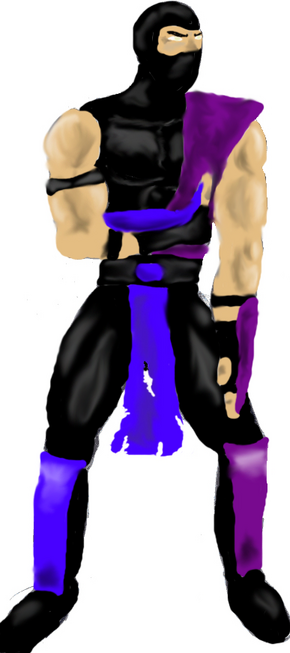
image.png

it started off as scorpion doing pi gua but i quickly decided to try and draw a lesser known character, then i decided to draw image's avatar.
i'm not really bothered about ratings, i think it's shite. i'm more interested with help on how to improve it
 
After saying how that is a great job for starting off on photoshop, I would like to say that it seems too..... "thick". The feet look out of proportion.

As for improving, don't make the characters head too round. Yes, you traced it from an oval, but that doesn't mean the face has to be in that oval-shape. I'm no art prodigy though, but you get the jiff of it.
 
the left foot is the wrong shape for starters (Does not know where to being other then that... ) O.o' Also the shading does not look right... Angles look as if their heading off in the wrong direction (on the chest at least and arms).

Its good... But you need quite a bit of practice I think. :? 6/10
 
Hey dude i thing it is pretty good. I can't do anything like that. BTW where do you get the images that you can alter to make cool signatures?
 
I think it looks cool. Yeah it needs a bit of fixing, but it's better than I could. I like it. Nice job!
 
I think the main prob is the shading just looks so flat. How many layers are you using for the skin?

I normally use 3 colours for skin on 3 different layers, a light colour, a medium tone colour and a dark toned colour?

Sometimes more.
 
pfft, i only used one layer lol. im an mspaint user at heart, n remember i only just started with photoshop. i mainly used it for the effects. anyone know anywhere i could get a freeware of adobe photodeluxe? i rule on that program
 
I only ever use one layer as well. Find the tone I like and fill it in. I might go behind that and add some touch up with a red or purple airbrushing for veins and high spots etc. After that I just lighten/darken it up for the shading. Seems to work well for me at least.
 
If you put one colour one one layer, then put another layer on top with a shading colour, if you make a mistake you can correct it easy. Why it's good to learn how to use layers, in the end it makes the picture more complex but easy to organise. Otherwise you maight as well not bother with photoshop because there are other programs out there that do the effects photoshop does only better. Can't name any off by heart but I have heard names of programs.

Also, do you have a PC Tabletpen? If your drawing characters this device helps. I know they cost about £20-£60+ usually.

http://h18000.www1.hp.com/products/tabletpc/tc1100/images/product_shot.jpg

The current new tablets are high-tech, but you don't need a really cool-looking one. £20 one will no thrills is all you need for this sort of thing. It makes your drawing much easier then a mouse.
 
Top