

H2O FARMER
New member
So me and my friends had a couple complaints with the dpad and its functionality.I like to mess with things and had a baggie full of extra controller parts so decided to play around and this is what I came up with.

Once in the controller it looks like this.
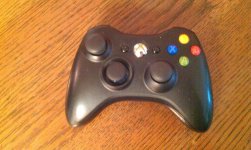
To me and the few that have tried this it almost feels like cheating its so accurate.You also get less thumb fatigue.
It is reversible so long as you have an extra dpad base and thumbstick to sacrifice.
TUTORIAL:
Disclaimer:This will void your controllers warranty.I am not responsible if you attempt these mods and mess up/destroy/break/whatever your controller.These pics dont show how rough the controller looks when done(I.E. It looks better in these pics than it does in reality.)
With that being said lets get started.
Parts needed:
Extra dpad base and thumbstick.Well you dont really need the extra base but it makes it so you can reverse it if you dont like it or want to switch to an actual dpad for a different game.
Tools needed:
I recommend a Dremmel tool for speed, ease, and probably a better looking finished product.
Hacksaw
#1 phillips screwdriver
#8 Tamper proof torx
Hand file/sand paper
Razor/exacto knife
Drill with bit small enough to fit in the dpad base holes.
Just so everyone knows I couldnt find my other unmodded controller so Im using one thats already done so make sure to thoroughly read each description where I expain whats already been done because when you pull your controller apart for the first time a few things will look different than the pics.When I find the other controller or next time I do a fresh mod to one Ill take some pics of bone stock parts.
1:Removing the controller screws:
Remove the battery and you will notice a little barcode sticker.Underneath that sticker is where 1 of the 7 torx screws are.The rest are plainly visible.Once the screws are removed just pull the shells apart.

2 ull the PCB and rumble motors out.
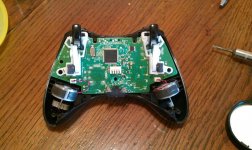
3:Remove the button contacts,buttons, and dpad.If you look at the dpad there are 2 small #1 screws inside that must be removed prior to removing the dpad.

4:Removing some controller material.This is one of the times the Dremmel tool would come in handy I used a razor knife to remove the plastic ring where the dpad is.This is also one of the times I mentioned in the beginning where I dont have a pic of what the stock shell looks like but youll see what it should look like when done.


5:The new Thumbpad.Im gonna break this into 2 parts.
A pad base.This is also a time when I dont have a pic of stock parts but finished product.
Ok theres 2 towers with fins that are normally on the top of the base.A dremmel would also be handy here but I used the hacksaw and sawed off the tower and fins flush with the base.

B:The thumbstick.Here I took the razor knife and cut about 3/8ths of an inch from the tower of the thumbstick.In the pic you can see before and after.

Once the plastic dome is gone you have to either cut or file the little knob thats left on the bottom.

Once thats gone and its nice and flat and sits flush and even to the dpad base you wanna drill 2 tiny holes through the holes of the dpad base into the shortened thumbstick.

After thats done screw the thumbstick to the dpad base.

6:Assemble the controller.Dont forget the rubber button contacts.I do occasionally.
7:ENJOY!!!!!!
Please leave feedback good or bad.
Once in the controller it looks like this.
To me and the few that have tried this it almost feels like cheating its so accurate.You also get less thumb fatigue.
It is reversible so long as you have an extra dpad base and thumbstick to sacrifice.
TUTORIAL:
Disclaimer:This will void your controllers warranty.I am not responsible if you attempt these mods and mess up/destroy/break/whatever your controller.These pics dont show how rough the controller looks when done(I.E. It looks better in these pics than it does in reality.)
With that being said lets get started.
Parts needed:
Extra dpad base and thumbstick.Well you dont really need the extra base but it makes it so you can reverse it if you dont like it or want to switch to an actual dpad for a different game.
Tools needed:
I recommend a Dremmel tool for speed, ease, and probably a better looking finished product.
Hacksaw
#1 phillips screwdriver
#8 Tamper proof torx
Hand file/sand paper
Razor/exacto knife
Drill with bit small enough to fit in the dpad base holes.
Just so everyone knows I couldnt find my other unmodded controller so Im using one thats already done so make sure to thoroughly read each description where I expain whats already been done because when you pull your controller apart for the first time a few things will look different than the pics.When I find the other controller or next time I do a fresh mod to one Ill take some pics of bone stock parts.
1:Removing the controller screws:
Remove the battery and you will notice a little barcode sticker.Underneath that sticker is where 1 of the 7 torx screws are.The rest are plainly visible.Once the screws are removed just pull the shells apart.
2
ull the PCB and rumble motors out.3:Remove the button contacts,buttons, and dpad.If you look at the dpad there are 2 small #1 screws inside that must be removed prior to removing the dpad.
4:Removing some controller material.This is one of the times the Dremmel tool would come in handy I used a razor knife to remove the plastic ring where the dpad is.This is also one of the times I mentioned in the beginning where I dont have a pic of what the stock shell looks like but youll see what it should look like when done.
5:The new Thumbpad.Im gonna break this into 2 parts.
A
pad base.This is also a time when I dont have a pic of stock parts but finished product.Ok theres 2 towers with fins that are normally on the top of the base.A dremmel would also be handy here but I used the hacksaw and sawed off the tower and fins flush with the base.
B:The thumbstick.Here I took the razor knife and cut about 3/8ths of an inch from the tower of the thumbstick.In the pic you can see before and after.
Once the plastic dome is gone you have to either cut or file the little knob thats left on the bottom.
Once thats gone and its nice and flat and sits flush and even to the dpad base you wanna drill 2 tiny holes through the holes of the dpad base into the shortened thumbstick.
After thats done screw the thumbstick to the dpad base.
6:Assemble the controller.Dont forget the rubber button contacts.I do occasionally.
7:ENJOY!!!!!!
Please leave feedback good or bad.
Attachments

Last edited:


