Mortal Kombat HD Remix with MUGEN

And here is an example of 5 minutes of edits which can help it look closer to the original. I know you can do much better than this MrMos3s but I wanted to point out the areas where the shadowing can be tweaked. Also needed to reshape him a bit with liquify tool.
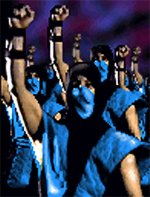
Sub_Ending.png

Sounds good, I'm messing with the size of a few things on the first pose to match the original in some areas, it's actually turning out really well and I'm probably going to post what I've done with that first. Soonishly.
 
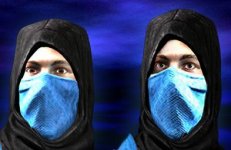
I think the mask should be a tighter fit to the face and more refined instead of the "loose" look. Work on the skin texture a bit too, its too glossy/plastic like. Other than that it looks great.(talking about the sub-zero render)
 
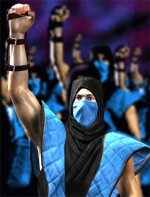
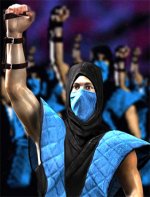
Okay, this is no where near final, still have lots to do. The only things I've done so far are adjust his head size, vest and the lighting in his vest around his left arm, thought it matched the original a bit more. I will continue working unless instructed otherwise ;)

1.jpg

2.jpg 3.jpg
(adjusted version on the right, if that wasn't obvious.)

Things like skin textures/tones, background, his clones, other lighting and everything else coming soon.

Wouldn't mind having Bleed's input on the shape fixes and/or what he's thinking of the model in general. :)
 
Last edited:
And here is the other image:

SUBZERO_ENDING_POSE_1.png

That looks totally awesome! But an important request- please make those eyes squint (a little). In this photo, he looks surprised at something, as if he took a big gasp. What his face should really express is a "I'm gonna get you for this!" look.

Details: His eyebrows can relax just a little and slightly squint his eyes.
See http://mkw.mortalkombatonline.com/mk1/subzero/

If anyone else differs, then disregard my post. At this point I'm just occasionally wondering around and checking the progress, and helping with suggestions.
 
That looks totally awesome! But an important request- please make those eyes squint (a little). In this photo, he looks surprised at something, as if he took a big gasp. What his face should really express is a "I'm gonna get you for this!" look.

Details: His eyebrows can relax just a little and slightly squint his eyes.
See http://mkw.mortalkombatonline.com/mk1/subzero/

If anyone else differs, then disregard my post. At this point I'm just occasionally wondering around and checking the progress, and helping with suggestions.

I agree, I was going to give it a shot in photoshop, but with a close up like this it may be better to let you (calactyte) give another go at some slightly more relaxed and squinty eyes like The Grid mentioned, or maybe Bleed could do some of his eyeball magic.

I should have no problems working with his eyes in the other ending shot though.
 
I think the model looks great..I don't even want to think about how many hours ill be looking at it for..I'm not to familiar with mugen tho,i mean i know what its all about but ive never had a reason to mess with it until now..Would i be correct to assume that the game will play exactly like mortal kombat for arcade???
 
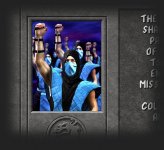
Guys, there is a problem with Sub-Zeros' fist. I pointed this problem out earlier to Bleed,
he agreed and fixed it. Not sure why it's back again. This is not what a closed fist looks like,
it's unnatural. I know this is a detail but once you see it you can't unsee it and it's bugging me.

I'll try to find my older post about this and edit this one.
(and try to find Bleeds fix)


EDIT:

Here's my original post:

@Bleed
TYM looks fantastic, but I still don't like the fist in the winning pose.
I think the palm of his hand shouldn't be so visible since it's a closed fist.

You have it like this:
fkpgjl.jpg
and I think it should be more like this:
e9dcp5.jpg

And here's the fix:


I think this would be a much better solution for Subs ending:

a9p8m.png


The position of the arm looks better, and fist is closed like it should be.
 
Last edited:
Okay, have to go to bed, here's what I did to the face..

faceexamp.jpg
(keep in mind, this will be half the size that you're seeing it here.)


And here's this....
subendsamp.jpg
(after uploading, I see this isn't the greatest example, I'll get ya tomorrow guys.)

Thanks for catching that la_luna. I'll work on his fist tomorrow.
 
Unfortunately you'd be incorrect. It'll be close but tournament players will complain because it will not be anything close to exactly the same. I trust Interloko's coding skills though and I'm betting he can get it 85% close to where non tournament players won't notice a change at all.


I think the model looks great..I don't even want to think about how many hours ill be looking at it for..I'm not to familiar with mugen tho,i mean i know what its all about but ive never had a reason to mess with it until now..Would i be correct to assume that the game will play exactly like mortal kombat for arcade???
 
People, ill give bleed a good challenge, try to make later umk3 unmasked sub zero...it will be hard xD, you will later discover why

people do you still realise that there is two more image of scorpion to do?
 
Last edited by a moderator:
I count one..unless you are talking about the Full Motion Video sequence in the beginning?

OK Sub fist should be better now. Also I removed some of the custom lighting, I think it's better to let MrMos3s be the one to mess with it.

SUBZERO_ENDING_POSE_2_b.png
 
Last edited by a moderator:
The forearm should be bow a little outward, looks wrong on the raised arm. Easy fir with the liqify tool. If you are removing, yellow parts, set the air brush style to colorize and pick the blue color and dab it out.

The fist can be fixed buy cutting the fingers out, squashing the lower part of the hand and moving the fingers down.
Blend it back in and you're set.

The hand was not modeled correctly, that's why this happens. I made the palm too long or didn't put the bones for the fingers far enough in to the palm. This is an old file, It looks better in the new ones, but still not perfect.


To fix the shine, take a soft brush at a low opacity and pick a color that is light but not too white.

Sketch over the shiny parts, but don't cover it completely. Maybe the brush can be very small, and just make little scratches over the highlight, to break it up.

In 3Ds.max you can play with the SSS skin shader, and lower the specularity setting.


I made the character shine like this, because the sprites were looking too flat without it at first.

 
Last edited:
The forearm should be bow a little outward, looks wrong on the raised arm. Easy fir with the liqify tool. If you are removing, yellow parts, set the air brush style to colorize and pick the blue color and dab it out.

The fist can be fixed buy cutting the fingers out, squashing the lower part of the hand and moving the fingers down.
Blend it back in and you're set.

The hand was not modeled correctly, that's why this happens. I made the palm too long or didn't put the bones for the fingers far enough in to the palm. This is an old file, It looks better in the new ones, but still not perfect.


To fix the shine, take a soft brush at a low opacity and pick a color that is light but not too white.

Sketch over the shiny parts, but don't cover it completely. Maybe the brush can be very small, and just make little scratches over the highlight, to break it up.

In 3Ds.max you can play with the SSS skin shader, and lower the specularity setting.


I made the character shine like this, because the sprites were looking too flat without it at first.

MrMos3s let me know if you'll be needing any re-renders to help fix stuff.
 
MrMos3s let me know if you'll be needing any re-renders to help fix stuff.

I'm ready, just want to make sure we're all good with the latest model? I noticed his head is facing to his right a little more, just want to make sure we're all good before I get too crazy. lol
 
As far as the shape and positioning of the sub model, I didn't get to show a good example of how I changed it.

From here I could still fix the fist, arm, face & mask, and put in the new lighting & textures, or should we use new or latest 3D model? Whatever you guys decide.

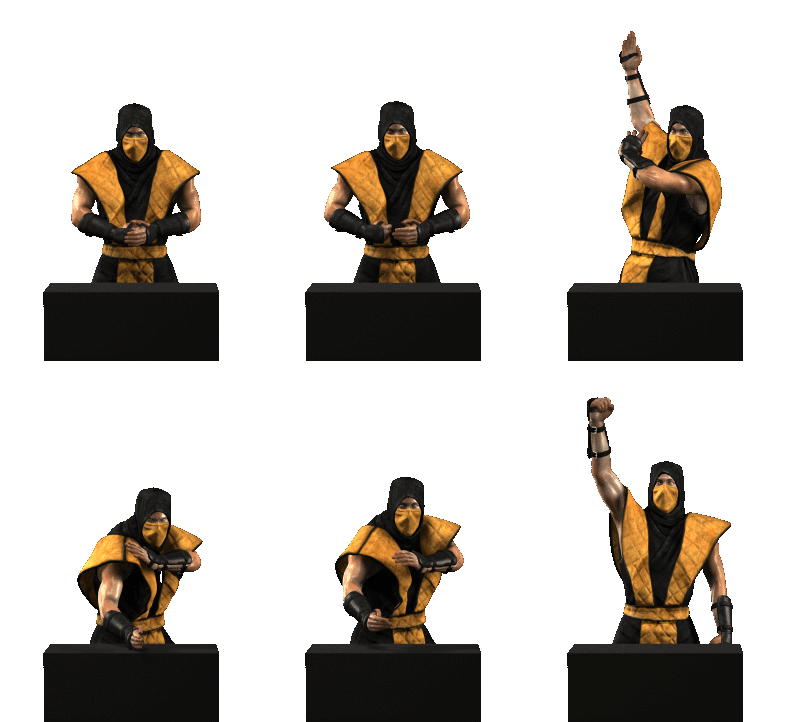
Little animation explaining the changes.
2weaoas.gif


Also, had an idea to use your earlier Sub models as his clones in the background, giving them each a little different feel. Eh? Yeah?
 
Top